
This feature is available for the following products:

Notes:
Advanced eligibility criteria are enabled by default for Golf Genius TM Association customers. If you are a Golf Genius TM Premium customer and would like this feature enabled, contact your Golf Genius Account Manager.
This feature must be enabled together with Invitation Lists.
If you are a Golf Genius TM Premium customer and would like to set Event and League Registration eligibility criteria for an Event/League, a simpler method might be available. Click Here for details.
In many cases, golf associations have eligibility requirements that must be met before a member, guest, or team can register for an Event/League. For example, golfers may need to be male or female, or within a certain age group. Sometimes they must meet several criteria to be eligible.
In this article, we will discuss the following:
Configuring registration to allow eligibility requirements.
Setting up member eligibility criteria.
Setting up team eligibility criteria.
Setting up guest eligibility criteria (UK and Ireland WHS customers only).
What golfers see when they don't meet the criteria.
If you want to stagger registration for members eligible for the Event/League, Click Here for details.
Configuring Registration to Allow Eligibility Requirements
Before you can apply eligibility requirements, your registration must be set up correctly on the Registration Setup tab of the Registration Center. The setup you need depends on whether your registration includes a payment and whether the Event/League is for individuals or teams.
For Registrations without Payment
To set eligibility requirements, the number of members/guests who can be registered must be set to one of the following:
Individual Events: The number of members who can be registered must be one (minimum and maximum set to 1).
Team Events: The number of members/guests who can be registered must be two or more.

For Registrations with Payment
To set eligibility requirements, the registration form must be set to one of the following:
Individual Event (Singles):
Member (can register themselves and other Members)
Member(s) and Non-Member(s) (Member can register themselves and other Members or Non-Members)
Member(s) or Non-Member(s) (Either a Member or Non-Member can register independently)
Team Event:
Non-Member (can register themselves and other Non-Members)
Member (can register themselves and other Members)
Member(s) and Non-Member(s) (Member can register themselves and other Members or Non-Members)
Member(s) or Non-Member(s) (Either a Member or Non-Member can register independently)

Setting up Member Eligibility Requirements
To set member eligibility criteria, follow these directions:
Navigate to Event/League > Registration Center > Registration Setup tab.
Below the member/guest selection, select the "Eligibility Criteria" tab (as shown below).
Select one or more of the criteria below.
Click "Save" to apply the settings.

Note: If you allow division selection using eligibility criteria, Click Here for instructions instead.
The following member eligibility criteria are available:
Gender: If the Event/League is restricted to men only or women only, select whether men or women are eligible.
Golfers must have a GHIN number on file: Restricts registration to members with a GHIN number on file. Members without a GHIN number in the system can't register.
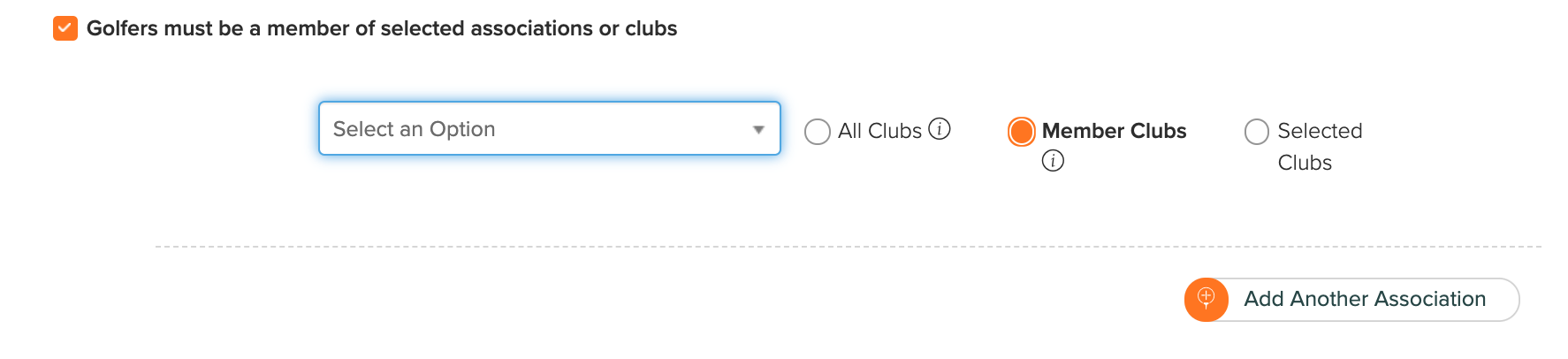
Golfer must be a member of selected associations or clubs (Association Customers Only):

This option extends eligibility beyond your association members to include members of other associations, their clubs, and their directly authorized clubs (DAC), or members of specific clubs within other associations.
To extend eligibility, check "Golfer must be a member of selected association or clubs" and choose one of the following options:
All Clubs: To extend eligibility to all members of another association, its clubs, and its DAC, select the association from the list, and select the "All Clubs" option. To extend eligibility to additional associations, click "Add Another Association" and repeat the prior steps.
Member Clubs: To extend eligibility to all members of another association (not including its directly authorized clubs), select the association from the list, and select the "Member Clubs" option.
Selected Clubs: To extend eligibility to members of specific clubs in another association, follow the same steps as above but choose the "Selected Clubs" option. After you select an association, you can select one or more clubs within that association.
Golfers must be a member of selected membership programs: Restricts registration to members of a specific membership program. Members can't register if they aren't in the selected membership program.

Note: WHS customers can't restrict Event/League registration by county or club directly. Instead, set the county or club restriction on a membership program's Player Eligibility Criteria, then select that membership program here.
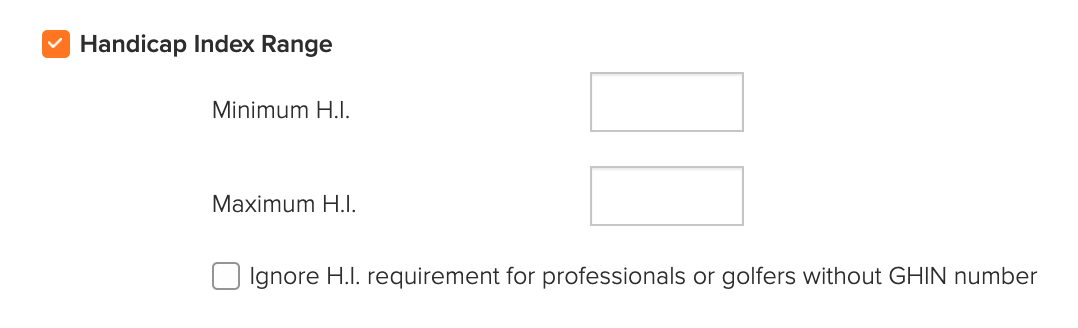
Handicap Index Range: Set a minimum and/or maximum Handicap Index.

If professionals or members without GHIN numbers are registering, you can waive this criterion for them.
A member's Handicap Index updates automatically when they log in to register, so it's current during registration.
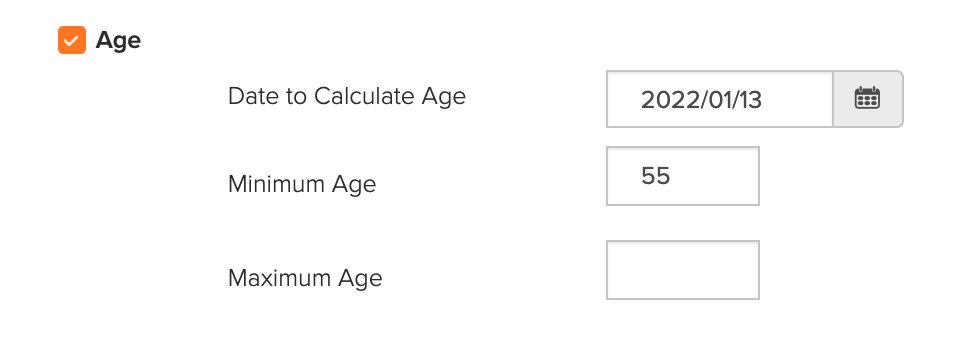
Age: If members need to be of a certain age or within a certain age range, you can set the parameters here.

Enter the date on which the age should be calculated, then enter the minimum and maximum age. If there is no minimum or maximum age, leave that field blank.
Other Custom Field: You can also set criteria using one or more custom fields from your Master Roster. For example, you may have a custom field identifying whether a member is a pro or amateur and their exemption status.

In the example above, only members listed as Pro and Exempt in the Master Roster can register.
For each custom field, choose how the value is compared:
Country, State, Single/Multiple Line Answer, Multiple Choice, and Yes/No fields: Equal or Not Equal.
Number and Date fields: Equal, Not Equal, Greater / Greater or Equal, or Less / Less or Equal.

Once registration opens, only members who meet the eligibility criteria can register.
Setting up Team Eligibility Requirements
To set team eligibility criteria, follow these directions:
Navigate to Event/League > Registration Center > Registration Setup tab.
Below the member/guest selection, select the "Team Eligibility" tab (as shown below).
Set one or more of the criteria below.
Click "Save" to apply the settings.

The following eligibility criteria are available for teams:
Handicap Index Range: You can set the following Handicap Index rules:
Maximum combined team Handicap Index
Minimum combined team Handicap Index
Handicap Index ranges for each of the players on a team, for example:
Player A has to be no more than 9.0
Player B has to be 9.1 to 13.5
Player C has to be 13.6 to 19.9
Player D has to be 20.0 or higher
When using Handicap Index eligibility criteria, the Handicap Provider and Handicap Index fields are required during registration. For complete details on team Handicap Index criteria, Click Here.
Age: Select the date used to calculate the age of players, the size of the team, and age ranges for players on the team. You can add multiple team sizes and multiple player age rules to each team size (as shown below).

Setting up Guest Eligibility Requirements (UK and Ireland WHS Customers Only)
UK and Ireland WHS customers can set eligibility criteria that guests (non-members) must meet to register. Guests are checked against the criteria when they're looked up by WHS Membership Number, using their WHS record.
Before you start:
Who can use it: UK and Ireland WHS customers.
Which registrations: Your registration must allow guests (Guest only, Member and Guest, or Member or Guest). Guest criteria aren't shown for member-only registrations.
Where to find it: Guest criteria are on the same "Eligibility Criteria" tab as member criteria.
Golfer lookup required: Guest criteria are only applied when a guest is looked up by WHS Membership Number during registration. You can set the criteria without the lookup turned on, but they won't be applied. To turn on the lookup, check "Allow golfers to register by Membership Number/CDH Number/Golf ID" in the WHS Registration section. For details on the WHS golfer lookup, Click Here.
Manual guest entry turned off: Make sure "Allow players to manually enter Guest details" is unchecked in the WHS Registration section. If it's checked, the guest criteria are reset to their defaults and can't be edited.
To set guest eligibility criteria, follow these directions:
Navigate to Event/League > Registration Center > Registration Setup tab.
Below the member/guest selection, select the "Eligibility Criteria" tab. Guest criteria appear in the same tab as member criteria (as shown below).

Set one or more of the following criteria:
Gender: Select whether men, women, or both are eligible.
Handicap Index Range: Enter a minimum and/or maximum Handicap Index. Leave a field blank if there is no minimum or maximum.
Age: Enter a minimum and/or maximum age. Leave a field blank if there is no minimum or maximum.
Allow iGolf users to register: iGolf is England Golf's membership for golfers who don't belong to a club. Guests with an iGolf membership are eligible when this is checked. It's checked by default.
Click "Save" to apply the settings.
Registration Process
Member Eligibility Criteria Not Met
Members who aren't eligible see a message when they try to register (as shown below).

The "Register" button is disabled, and members can hover over it to see why they can't register.
For team events, every member on the team must meet the member eligibility criteria. When choosing teammates during registration, only eligible members can be selected.
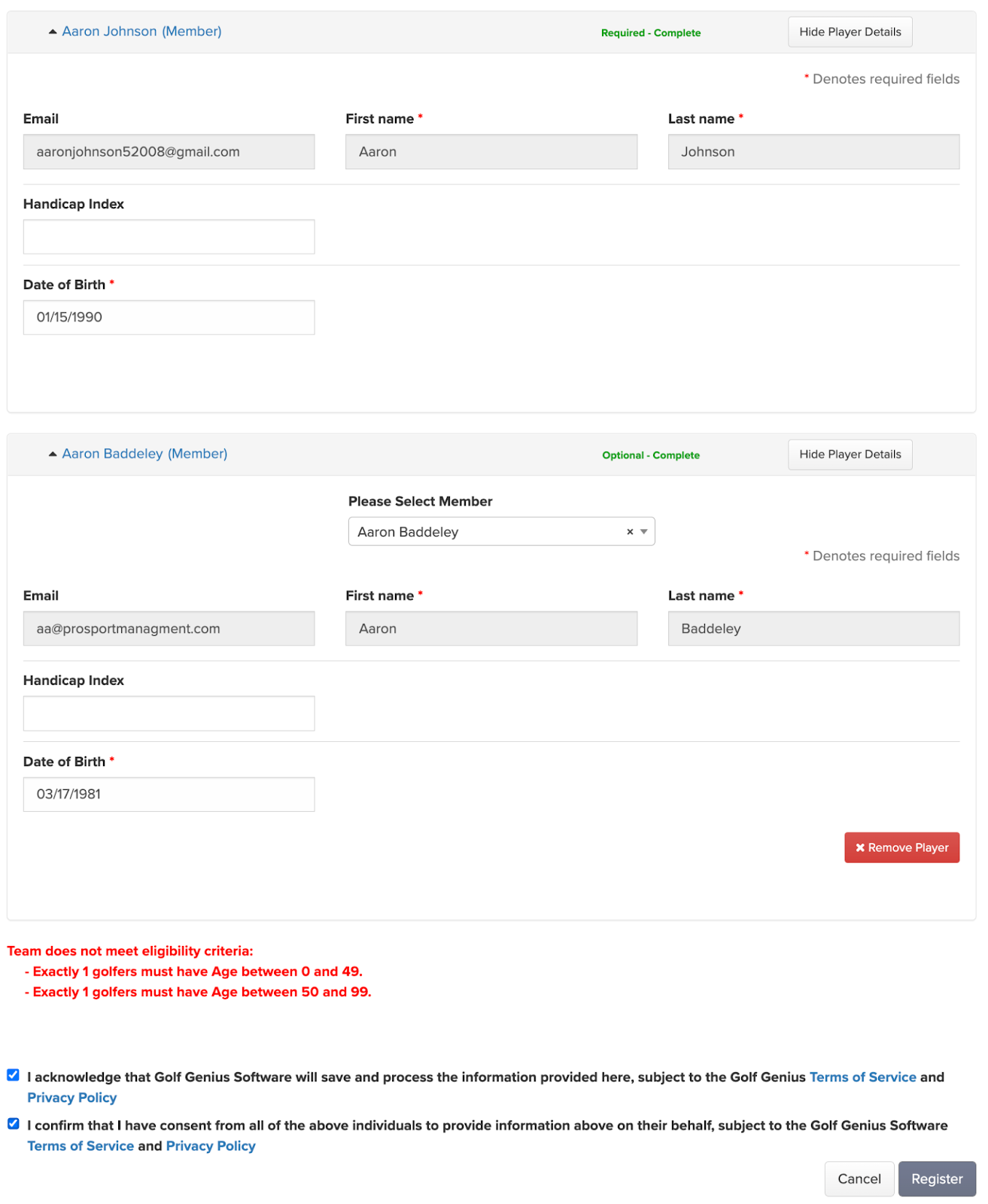
Team Eligibility Criteria Not Met
If the team isn't eligible, a message appears and the registrant can't continue with the registration (as shown below).
WHS Lookup Eligibility Criteria Not Met
When a registrant looks up a member or guest by WHS Membership Number, golfers who don't meet the eligibility criteria still appear in the search results. Clicking "Add" displays an error that explains why the golfer can't be added (as shown below).

A guest who is missing a WHS field used by the guest criteria (for example, no Handicap Index when a Handicap Index range is set) is also not eligible.