
This feature is available for the following products:

Players sometimes need to be refunded and removed from the roster when collecting Golf Hub Registration Payments.
In this article, we will discuss how to remove players from the event/league roster and how to issue refunds to players who registered using Golf Hub.
Remove Individual Player from the Roster
To remove a player from the roster, follow these directions:
Navigate to Golfers > Event/League Roster.
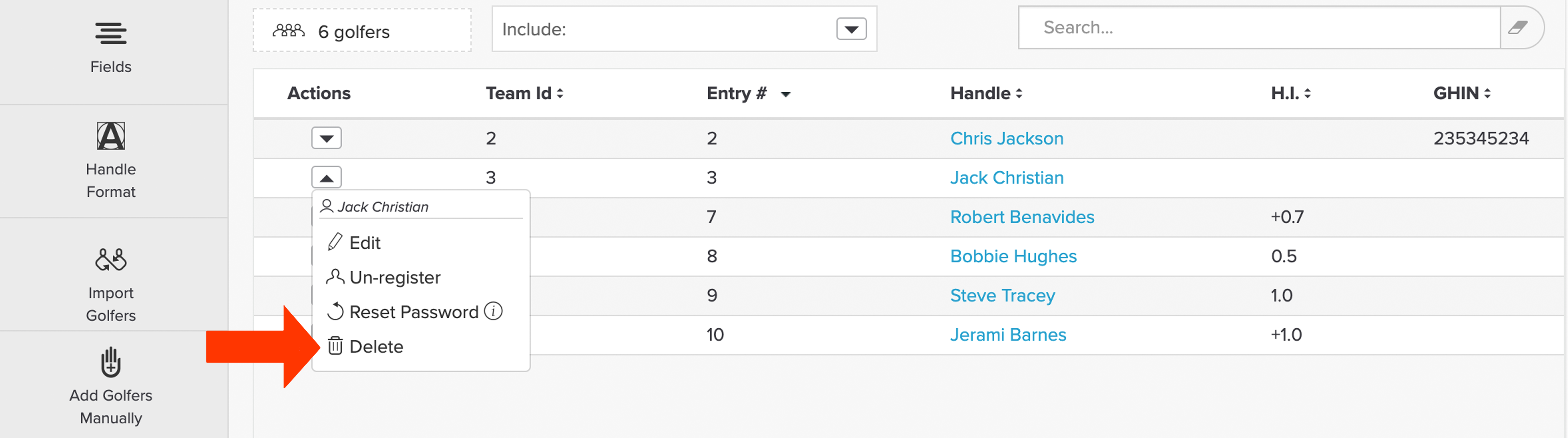
Under the "Actions" dropdown, select "Delete" (as shown below).

Click "Okay," and the player will be removed from the roster.
Removing the Entire Field from the Roster
Note: Take caution when using this action, as the roster cannot be recovered.
In some cases, you may have a large field of players on the roster in an event that has been canceled. Rather than going through and removing players individually, you can mass remove the entire field.
To remove the entire roster, navigate to Golfers > Event/League Roster > Fields > Delete Entire Roster (found at the bottom). For more details about deleting an entire roster, Click Here.
Refunding Players
To refund players who registered using Golf Hub, you must manually refund them from your Stripe Account. Stripe Support can provide additional assistance in refunding a player.
Note: If you turned on Auto refund in the registration setup's Player Permissions, golfers who cancel a paid registration are refunded automatically. If an automatic refund fails, the registration is still cancelled, and you'll need to refund the golfer manually in Stripe. For details, Click Here.